 DIYTech Labs
Simple, Useful Android Apps by DIYTech Labs
DIYTech Labs is an independent Android app studio. We build small, focused apps that solve one everyday problem well: drawing a signature, scanning a document, saving a status, or working out a calculation.
- No account needed
- On-device privacy
- Free on Google Play
 Draw Signature100,000+ installs
 DociqNew on Google Play
Featured Apps
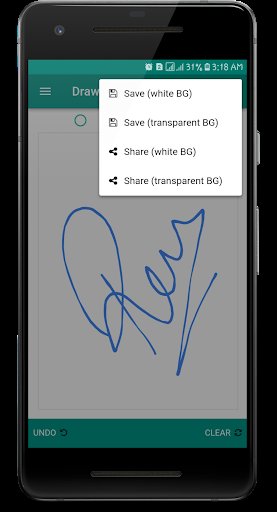
Two apps carry most of what we do. Draw Signature is the studio's longest-running app: a simple way to create a signature once and reuse it on any document. Dociq is our newest: a document scanner designed so your pages never leave your phone. Around them sits a small shelf of everyday utilities — a calculator, a status saver and more — each built to do one job without getting in your way.
Draw Signature
Create your handwritten signature by drawing on screen or typing in stylish fonts, then save it as a transparent PNG for documents and forms.
Dociq: AI PDF Scanner & OCR
Scan documents, ID cards and receipts into clean PDFs. On-device scanning and OCR, batch mode, and no account or upload needed.
More Apps
Smart Calculator, Status Saver Pro and more practical utilities from the same studio.
How We Build Apps
Privacy First
Our apps process your data on your device wherever possible. Signatures and scans are not uploaded to our servers, and most apps need no account at all. When a feature genuinely needs a third-party service, such as ads in a free version, the app's privacy policy says so in plain language.
Lightweight & Offline
Small downloads, fast startup, and core features that keep working without an internet connection. We test on ordinary phones, not just flagships, because that is what most of our users carry.
Free to Start
Every app is free to download and use, and the free versions are genuinely useful — no watermarks stamped over your exports to force an upgrade. Optional premium upgrades simply unlock extra power for heavy users.
From Tutorials to Apps
DIYTech Labs did not start as an app studio. It started in 2017 as DIY Tech Pro, a small tutorials project where founder Rahib Ali published the electronics experiments he was working on: making a laptop keyboard glow with a one-dollar USB light, wiring a headphone splitter by hand, testing the 18650 battery cells rescued from dead laptop packs. The write-ups were practical and step-by-step, and people read them — a couple are still linked from other websites today.
The readers changed the direction. Under the tutorials, people kept asking for the same thing in app form: the signature tool from a video, a calculator that did not fight them. So the projects became apps. The signature app grew into Draw Signature, and the habit of explaining things clearly became the studio's support style and the tutorials still maintained on this site.
Today the studio works the other way round: apps first, tutorials when they help. Dociq, our document scanner, follows the same rule the tutorials did — solve one real problem, respect the person using it, and keep everything on their own device. If you arrived here from an old tutorial, welcome back; the apps page is where that project lives now.
What is next is more of the same, deliberately. Dociq is now live on Google Play, Draw Signature continues to be maintained and improved, and the older tutorials on this site are being kept accurate rather than abandoned. We would rather have a short list of apps that people keep installed than a long list they try once — so new releases arrive when they are ready to be useful, not on a schedule.
- 2017DIY Tech ProElectronics tutorials and a YouTube channel for hands-on builders.
- 2017First signature appThe beginning of what is now Draw Signature.
- 2026A new home for the studiodiytechpro.com relaunched as the home of DIYTech Labs.
- 2026DociqAn on-device PDF scanner, now live on Google Play.
Questions, Answered
What is DIYTech Labs?
DIYTech Labs is an independent Android app studio run by developer Rahib Ali. It publishes small, focused utility apps on Google Play, including Draw Signature for creating signatures and Dociq for scanning documents.
Are DIYTech Labs apps free?
Yes. Every app is free to download and use. Some apps offer an optional premium upgrade for heavy users, but the core features work without paying anything.
Do the apps collect my data?
Our apps are built to work on your device. They do not require an account, and content you create, such as signatures and scanned documents, is stored on your device and is not uploaded to our servers. Each app's privacy policy explains the details.
Where can I get the apps?
All of our apps are published on Google Play under the developer name DIYTech Labs. The apps page on this site links to each one.
Looking for one of our apps?
All DIYTech Labs apps are published on Google Play under the developer name DIYTech Labs.
Browse Apps →